Gallery / Bars & columns
bar
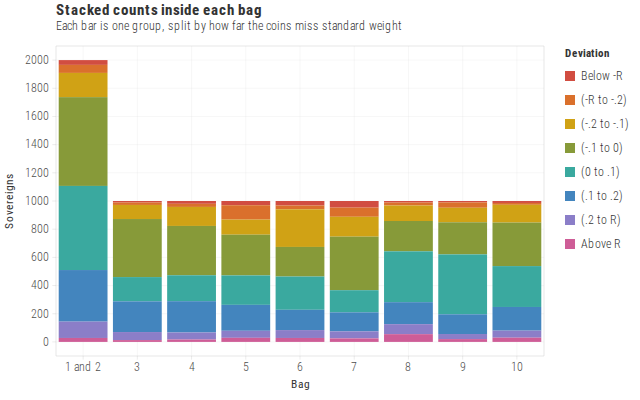
Stacked counts inside each bag
Stacked bars when you need counts and composition in the same mark.
Source
Svelte, builder, JSON
<script lang="ts">
  import {
    GeomBar,
    GGPlot,
    GuideLegend,
    Inspect,
    Labs,
    ScaleFillDiscrete,
    ScaleXDiscrete,
    ThemeLight,
  } from "@ggts-sh/svelte";

  import { pyxTrial } from "./data.js";
</script>

<GGPlot
  data={pyxTrial}
  aes={{ x: "bag", fill: "deviation", weight: "count" }}
  width={640}
  height={400}
>
  <GeomBar />
  <ScaleXDiscrete
    domain={["1 and 2", "3", "4", "5", "6", "7", "8", "9", "10"]}
  />
  <ScaleFillDiscrete
    domain={[
      "Below -R",
      "(-R to -.2)",
      "(-.2 to -.1)",
      "(-.1 to 0)",
      "(0 to .1)",
      "(.1 to .2)",
      "(.2 to R)",
      "Above R",
    ]}
    scheme="flexoki"
  />
  <ThemeLight />
  <GuideLegend channel="fill" focus />
  <Labs
    title="Stacked counts inside each bag"
    subtitle="Each bar is one group, split by how far the coins miss standard weight"
    x="Bag"
    y="Sovereigns"
    fill="Deviation"
  />
  <Inspect mode="exact" pin />
</GGPlot>
Meta
Details
- Family
- Bars & columns
- Source
bar/stacked- Rendering
- SVG
- Techniques
Related